LinkedIn event: the complete guide to creating one
In a few years, LinkedIn has become a major social network. With more than 706 million members, the platform connects professionals from around the world. Being on LinkedIn means maximizing your chances of developing your business, finding a job, finding out about news in your sector of activity and being able to expand your professional network. As part of its expansion and development, LinkedIn regularly highlights new features to improve the user experience. Among these advances is LinkedIn Events. Very recent, this functionality deserves to be known. Proinfluent gives you all the secrets of LinkedIn Events with a complete guide and tutorial.
1- LinkedIn Events: what is it?
LinkedIn Events, LinkedIn Events in French, allows members of the professional social network to discuss events planned in “real life” . The application is intended to be useful for anyone who wants to create an event, join it, invite other people, broadcast it or simply organize it.
There are many professional events: afterwork, networking, product launch, inauguration, seminars, meetings … To create links, expand your network, attract the press or simply promote your business, professional events are an integral part of life. at work. LinkedIn understood this well and developed the LinkedIn Events functionality.
The goal? Gather around an event all the members of the network having a relationship, directly or indirectly, with this same event. Organizers, participants, people likely to be interested, journalists, etc. Everyone can be invited and join the page of an event to gather information, see the program, ask questions before the big day and above all create a first link with the members who will participate in the event. .
Full of features that we will detail in the second part of this article on LinkedIn Events, the brand new application on LinkedIn is part of the social network’s progress approach. Wishing to integrate permanently into the professional world, LinkedIn continues to innovate and launch new functions. For LinkedIn, it is important to offer its users as many actions as possible, and this now happens, with LinkedIn Events, by the possibility of creating a virtual cohesion in advance of a physical event . This is a major advance in the development of the social network, which is experimenting with the application in order to have objective feedback from users in order to improve it as and when.
2- LinkedIn Events in detail
To make it easier for members of its network to establish professional relationships, LinkedIn has made LinkedIn Events a real practical digest. Let’s see together what are the main actions possible with LinkedIn Events.
- Create an event : LinkedIn Events is first of all designed to be able to create a page dedicated to a particular event. The event creator, from a dashboard, can set up many details: date, time, description and program, photos, etc. It is even possible to define a LinkedIn hashtag specially dedicated to the event, to allow LinkedIn members to follow it and not miss anything about it.
- Promote the event: this section allows the creators of the event to invite their contacts, and to share it on their LinkedIn news feed in order to encourage others to join it. Those who have responded favorably to the invitation will also be able to invite members of their own network and thus increase the reach of the event page.
- Manage the event: from the event dashboard, creators can directly access the list of participants, publish various information related to the future event, modify certain information, etc.
- Conversing with other participants: on the event page, it is possible to create a real discussion flow. On the event’s LinkedIn Events home page, anyone who participates will be able to post content. The idea is to bring together as many people as possible and encourage them to discuss the event to strengthen cohesion and allow the event, from the virtual platform, to grow before D-Day. Participants will even be able to discuss after the event to find people and consolidate their networks.
Still in the development phase, LinkedIn Events wants to acquire many other features in the future that will improve the user experience. Among them, the possibility of having access to LinkedIn events whose points of interest correspond to those of the members of the network. In the future, many options will be available to make LinkedIn Events a true engagement platform, which will mix the virtual and the real with its planned online and physical events.
The security aspect is also emphasized, since it is possible to configure the security and confidentiality options of the LinkedIn event . On LinkedIn Events, the event created can be set up publicly, where each active LinkedIn member can be able to join, or privately, leaving the organizer to choose who is invited. In addition, inappropriate content or overly aggressive remarks by certain members may be reported by participants and be deleted.
3- LinkedIn Events: complete tutorial to create your LinkedIn event
Thing promised, thing due! Find out now how to create your LinkedIn event to unite your entire network and that of your contacts around a particular occasion. From your computer or your mobile, with the LinkedIn application, create an event from A to Z to ensure a success that everyone will remember!
a- Create the LinkedIn event page
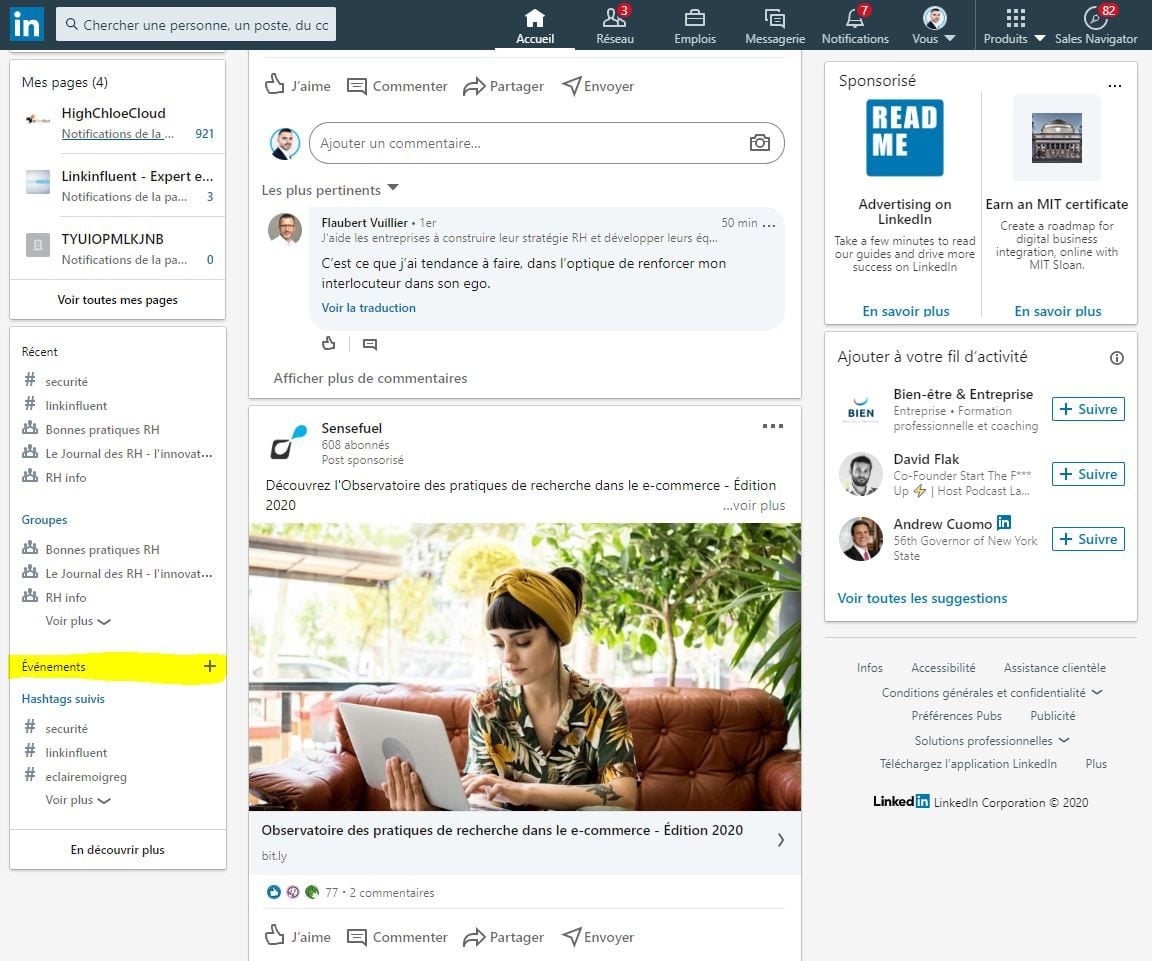
- On the LinkedIn home page, in the left menu that appears under the sidebar of your LinkedIn profile, click the + located next to the tab Events .
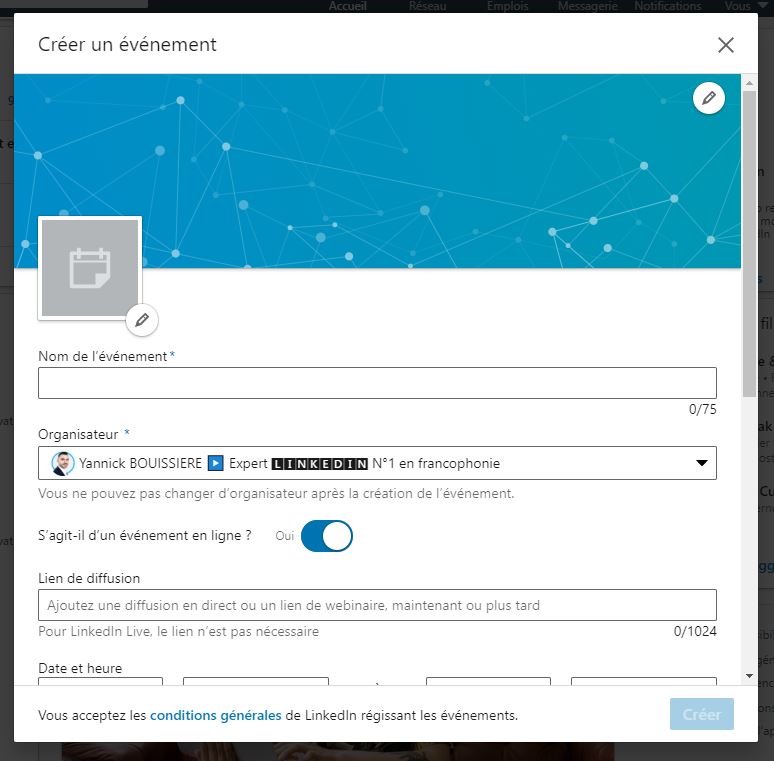
- A window appears, you fill in the fields with the basic information of your LinkedIn event. Among this information, you have the choice of the confidentiality of your event. a public event is accessible to all LinkedIn members, and they can click Join as well as Share Event and invite others. a private event It is only accessible to people invited by the event organizer or other participants if the organizer has agreed that the invitees can themselves invite their contacts. Depending on the nature of your LinkedIn Events, it’s up to you which option to choose.
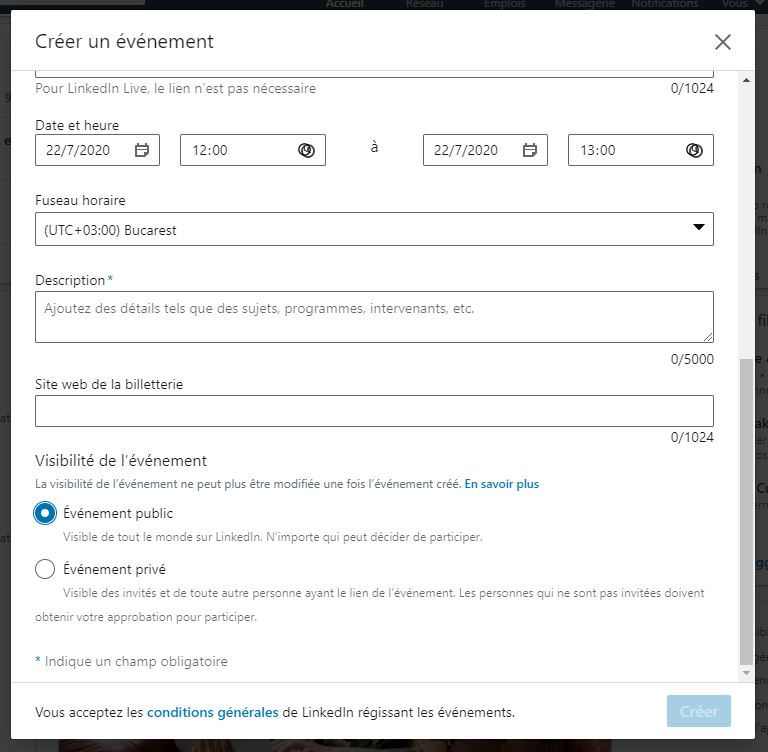
- Then click on To create to be redirected directly to your own LinkedIn Events page!
Important! At this time, you cannot change the privacy of an event once it is created.
b- Manage the details of your LinkedIn event
Now that your LinkedIn event page is created, you, as the event organizer, can add lots of details to it to attract attendees and provide them with practical information. To do this, go to your LinkedIn event page:
- On the home page and in the left menu, click Events and select the event you just created.
- At the top of the page you will find the button To modify . Click on it and select Edit event in the menu that unfolds. All the sections, detailed below, can now be modified.
Do not forget to click on Save once you have made all your changes! It would be a shame to have to redo everything.
- Event logo: you can add a picture of 400px x 400px to provide a visual for your LinkedIn Events. Depending on the nature of the event, the logo can take a variety of forms, but prefer something simple, such as your company logo.
- Banner: a picture of 1766px x 444px can be added to your LinkedIn event. It brings color to your LinkedIn Events page and can even, if you want an original banner, contain information such as the slogan of your event or the date and time of said event. To learn more, here is the tutorial to create your LinkedIn banner .
- Event name: so that all your participants unite around your event, it is essential to give it a name!
- Site : make sure to indicate an exact address so that your participants can join the event on D-Day without getting lost.
- Location details: do not hesitate to add purely logistical information in this section. You can indicate the presence or not of a parking lot, a distinctive sign to find the place of the meeting more easily, practical advice, the floor, etc.
- Date and hour : the date and time of your event are, you can imagine, essential.
- Time zone: be sure to determine the time zone for your event. Remember that on LinkedIn, you may come into contact with people who are on the other side of the planet!
- Description of the event: it’s up to you to make people invited to take part in your LinkedIn Events. Here, indicate the objective of your event and its strengths.
- External URL: in this section, you can insert the link of a ticket office, if necessary, of a website, of a blog , of a youtube video etc., so that your guests can discover even more information about the LinkedIn event they are invited to.
Note: if you change the date, time or location of an event, your guests will automatically receive a notification to be informed.
c- Invite contacts to take part in your LinkedIn event
Once your LinkedIn Events page is well informed, it will be time to send out your invitations! Note that you will only be able to invite your first degree contacts.
- Go to your LinkedIn event page.
- To the right you will find the button Invite other people .
- You can then invite your contacts. To do this, you can either type the name of your guests in the search bar, or use the filter available to you to select guests according to specific criteria.
- In front of the name of the people invited will be checked a small box.
- Click on Invite . Your guests will receive a notification.
d- Promote the event
If you’ve chosen to put your LinkedIn event in public mode, you can share it on your news feed to increase its visibility and get other people who might be interested to join.
- Go to your LinkedIn Events page.
- On the right is the button Share the event .
- Insert a message to communicate around this sharing.
- Click on the button To post .
Your LinkedIn Events is now visible to your entire network. Note that attendees of your LinkedIn event can also share this event. A good point to extend your reach!
To boost your LinkedIn Events page and encourage participants to communicate around it, nothing like content! Do not hesitate to post publications on your LinkedIn event’s news feed in order to get invited people to react and interact.
- Go to your LinkedIn Events page.
- Click on the button Start a publication .
- You have carte blanche! Whether it’s a video, infographic, text, blog post, photo, etc., the content you are going to post should only relate to your event. and make your guests want to react. You can post a message inviting them to also post content on the event page to make it more lively.
- Click on To post .
It is possible to post on the event page before, during and even after the meeting!
e- Cancel or delete the LinkedIn event
If unfortunately you are required to cancel a LinkedIn event, you are welcome to report it and have the event appear as canceled. The LinkedIn Events page will remain active, which will allow the guests to be able to discuss and the organizer to possibly explain the reason for the cancellation.
- Go to your LinkedIn Events page.
- At the top of the page, click the button To modify .
- Click on Cancel event .
- To confirm the cancellation, click the button again. Cancel event which appears.
The deletion of a LinkedIn event is only possible 7 days after its cancellation (procedure explained above), or 7 days after its end, and implies its complete disappearance from LinkedIn. Neither the organizer nor the guests will be able to access the event page, and all actions, posts and content posted on the page will be deleted.
- Go to your LinkedIn Events page.
- Click on the button To modify .
- Click on Delete event .
- To confirm the deletion, click the button again. Delete event which appears.
You are now armed to create your own LinkedIn event and take advantage of this new functionality on the world’s largest professional social network. This application is quite interesting in the context of a social selling strategy, and allows to disseminate a lot of information while allowing participating members to meet.
LinkedIn Events: to remember
- LinkedIn Events is a brand new feature of LinkedIn that will allow you to create events on the platform to bring together members of the network to bring you all together in “real life”.
- From your LinkedIn event page, you can share a lot of information for your guests.
- Once the event is over, you will be able to exchange views on your event page with the people you have met, in order to perpetuate your professional relations.
LinkedIn event: to sum up in 2 questions
Qu'est-ce que LinkedIn Events ?
LinkedIn Events est une toute nouvelle fonctionnalité de LinkedIn qui va vous permettre de créer des événements sur la plateforme pour y fédérer des membres du réseau afin de vous réunir tous ensemble dans la « vie réelle ».
Où créer un événement LinkedIn ?
Sur la page d’accueil de LinkedIn, dans le menu de gauche qui s’affiche sous l’encadré de votre profil LinkedIn, cliquez sur le + situé à côté de l’onglet Événements.